

You spent hours researching keywords, carefully tweaking your pages, and hitting publish—only to watch your website sit on page five of Google.
What gives?
Here’s the deal: on-page SEO isn’t just about dropping a keyword into a title tag and calling it a day. Today’s search engines are smart. If you want real organic traffic, you need to understand what searchers actually want, analyze what’s already working, write content that genuinely solves problems, and keep fine-tuning your pages long after they go live.
A Quick Reality Check: On-page SEO is crucial, but it’s only one piece of the puzzle. Technical health, domain authority, backlinks, and overall competition all play a role in where you land. Think of on-page optimization as building a rock-solid foundation rather than a guaranteed shortcut to rank #1 overnight.
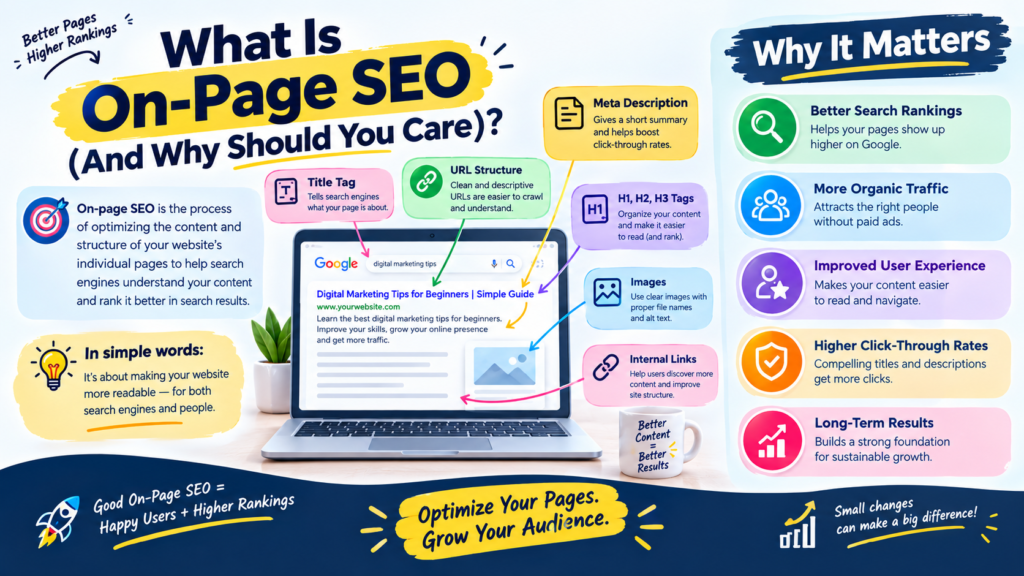
What Is On-Page SEO (And Why Should You Care)?
On-page SEO is the process of optimizing elements directly on your webpage so search engines understand your content and readers find answers to their problems.
Because this happens directly on your site, you have direct control over many of the changes made to the page.
Key elements include:
- Page titles & headings
- Content quality & natural keyword placement
- URLs & internal linking structures
- Image optimization & meta descriptions
- Search intent alignment & overall page experience
Why It Matters
Imagine typing “How to improve Google search ranking” into Google.
If you land on a page that simply repeats that exact phrase 50 times without giving real, actionable advice, you’re hitting the back button immediately. If a page doesn’t satisfy the searcher’s needs, it may struggle to perform well in search. Search engines pay close attention to how users interact with your content.
Instead, a great page steps up to solve the reader’s actual problem: it breaks down search intent, page structure, headings, internal links, and performance tracking in a way that actually makes sense.
Case Study: Reviving a Stagnant Article
To see how this works in the real world, here is how I updated an old blog post that was getting practically zero organic traffic.
- The Problem: An article targeting “beginner budget tips” was stuck on page 6 of Google despite having 2,000+ words of detailed advice.
- Before:
- Title Tag: Budget Tips – Financial Advice for Beginners
- Heading Structure: Random H3 headings used just to change font sizes.
- Content: General financial theory without concrete steps or visual tools.
- Internal Links: Zero links pointing to or from other pages on the site.
- What I Changed:
- Updated the title tag to match search intent: 10 Practical Budget Tips for Beginners (That Work in 2026).
- Reorganized the heading structure into a clean H1 → H2 → H3 hierarchy.
- Added real-world budgeting comparison tables and quick, step-by-step instructions.
- Built 4 contextual internal links from related finance articles across the site.
- Why I Changed It: The original post ignored search intent—people searching for this topic wanted an actionable framework they could use immediately, not abstract financial theory.
- The Result: Within 6 weeks of updating and requesting re-indexing, impressions increased by 310% in Google Search Console, and the page jumped from Position 58 to Position 11 for its primary query. I still check CTR and position data regularly to see where to make minor copy tweaks next.
Real-World SERP Analysis Example
Before writing or rewriting a single word, search your target keyword on Google to see what users expect. Here is an actual analysis breakdown for the keyword “on-page SEO checklist”:
- Target Keyword: On-page SEO checklist
- Search Intent: Informational / Practical Tool (User wants a quick, step-by-step reference)
- What Currently Ranks: Clean, actionable guides with copyable or downloadable checklists near the top.
- Common Topics Covered: Title tags, heading structure, image alt text, clean URLs, internal links, page speed.
- What Competitors Miss: Most top results offer pages of theoretical fluff before showing the actual checklist. Many completely skip post-publishing steps and Google Search Console measurement.
- Content Opportunity: Put the interactive checklist upfront, offer clear visual summaries, and explain how to execute each step without filler.
A Practical 11-Step On-Page SEO Workflow
Instead of treating SEO as a random collection of tasks, follow this repeatable process:
- Understand Target Audience → Define who is reading and what problem they have.
- Identify Primary Topic → Pick one main subject per page.
- Analyze Search Intent → Match your format to what searchers expect.
- Create Content Structure → Build a logical heading hierarchy.
- Optimize Page Title → Write a clear, click-worthy meta title.
- Create Helpful Content → Focus on solving the underlying question.
- Use Keywords Naturally → Avoid forced repetition or density targets.
- Keep URLs Clean → Short, descriptive slugs win.
- Build Internal Links → Connect related posts on your site.
- Optimize Images → Compress files and add helpful alt text.
- Write Meta Descriptions → Give searchers a compelling reason to click.
Step 1: Understand Your Target Audience
Before writing anything, ask: Who is searching for this, and what specific problem are they trying to solve right now?
Step 2: Identify the Primary Topic
Choose one primary topic per page to keep your focus sharp.
- Primary Topic: On-Page SEO
- Supporting Concepts: Search intent, internal linking, image alt text, page titles, heading structure.
Step 3: Analyze Search Intent
Match your content format directly to what searchers want to find:
| Query Type | What Searchers Want | Suitable Content Format |
| Informational (What is SEO?) | To learn a concept | Beginner guide, explainer post |
| Commercial (Best SEO tools) | To compare options | Comparison list, review roundup |
| Navigational (Google Search Console) | To find a specific page | Direct link or resource page |
| Transactional (Buy SEO software) | To buy right now | Product page, pricing grid |
Step 4: Create Your Content Structure
Organize your page logically using proper heading tags so both readers and search engine crawlers can scan it quickly.
- ❌ Bad: Using H3 tags everywhere just because you like the font size.
- ✅ Better: H1 for Page Title → H2 for main sections → H3 for sub-points under those sections.
Step 5: Optimize Your Page Title
Your title tag should clearly state what the page covers and give searchers a reason to click through.
- ❌ Weak: SEO Tips
- ❌ Keyword-Stuffed: On Page SEO Tips Keywords Optimization Ranking 2026
- ✅ Better: On-Page SEO for Beginners: A Practical Guide to Website Optimization
Step 6: Create Helpful Content
When answering a query, give complete, practical steps rather than generic advice.
- ❌ Weak Answer to “How to improve ranking”: “You need to use good SEO techniques and write quality articles often.”
- ✅ Better Answer: “First, check search intent in Google SERPs. Next, re-structure your headings to answer common user questions. Third, add 3–4 internal links from high-performing pages on your site.”
By providing real solutions, you give the page a stronger foundation for performing well in search.
Step 7: Use Keywords Naturally
Forget arbitrary “keyword density” percentages. Focus on thorough topic coverage instead.
- ❌ Keyword-Stuffed: “If you want good on-page SEO, our on-page SEO guide shows you on-page SEO techniques for on-page SEO ranking.”
- ✅ Natural Writing: “Mastering on-page optimization involves refining your titles, headings, and site architecture to provide a better user experience.”
Step 8: Keep Your URLs Short and Descriptive
Create clean URLs that make it obvious what the page is about at a glance.
- ❌ Bad: [example.com/blog/2026/category=seo&id=98234](https://example.com/blog/2026/category=seo&id=98234)
- ✅ Better: [example.com/on-page-seo-guide](https://example.com/on-page-seo-guide)
Step 9: Build Contextual Internal Links
Connect related articles on your site to help users navigate and help search crawlers understand how your content fits together.
- ❌ Weak Link: “To read about keyword research, click [here].”
- ✅ Better Link: “Before optimizing your pages, conduct [comprehensive keyword research] to identify what your audience is searching for.”
Step 10: Optimize Your Images
Keep image file sizes light and add descriptive alt text for accessibility and context.
- ❌ Bad Filename & Alt Text: IMG_0042.png | alt=”seo”
- ✅ Better Filename & Alt Text: on-page-seo-checklist.jpg | alt=”A complete checklist showing on-page SEO optimization steps”
Step 11: Write a Clear Meta Description
Write a concise summary that encourages searchers to click through from search results.
“Learn how to optimize your website step-by-step. Discover practical on-page SEO techniques, search intent tips, and a complete checklist to boost your site’s visibility.”
How to Measure Performance After Publishing
Optimization doesn’t stop when you hit publish. Use Google Search Console to monitor performance and make data-driven decisions:
Here’s how to read your core metrics and take action:
- High Impressions + Low Clicks/CTR: Your page shows up in search results, but users aren’t clicking. Action: Rewrite your title tag and meta description to make them clearer, more relevant, or more compelling.
- Ranking in Positions 8–20: Your page is close to page one, but lacks the depth or intent match to break into top spots. Action: Re-analyze search intent, add missing subtopics, or update outdated details.
- Declining Clicks over Time: The content may be getting stale, or competitors have published better resources. Action: Refresh facts, update dates and examples, and verify that search intent hasn’t shifted.
For detailed guidelines on indexing and site maintenance, check the official Google Search Central Documentation.
Complete On-Page SEO Checklist
Run through this checklist before and after publishing:
Pre-Publishing Sanity Check
- [ ] Indexability: Page is indexable and not blocked by a noindex tag or robots.txt file.
- [ ] Search Intent: Content format matches what currently ranks on page one.
- [ ] Title Tag: Includes primary topic, stays under 60 characters, and avoids keyword stuffing.
- [ ] Heading Hierarchy: One H1 tag followed by logical H2 and H3 sections.
- [ ] Clean URL: Short, descriptive slug containing the primary topic.
- [ ] Natural Writing: Primary keywords used naturally without artificial density targets.
- [ ] Image Optimization: Compressed images with descriptive file names and clear alt text.
- [ ] Internal Links Out: Links to 2–4 relevant, existing pages on your website.
- [ ] Internal Links In: Added links from existing high-value pages on your site pointing to this new article.
Common Mistakes to Avoid
- Chasing algorithms instead of helping people: Writing purely for search bots leads to robotic content that drives human readers away.
- Ignoring intent shifts: Publishing a 3,000-word history lesson when searchers just want a quick 2-minute checklist.
- Set-it-and-forget-it mindsets: Failing to review Search Console data or update old content over time.
- Making ranking guarantees: Claiming any single technique will “guarantee a #1 spot on Google” violates trust and ignores how search works. Review Google’s Search Essentials for official quality criteria.
Next Steps
On-page SEO isn’t about gaming the system—it’s about making your webpage the most useful, clear, and accessible answer to a searcher’s question.
Need help identifying technical issues or content gaps on your site? [Request a Free Website SEO Audit] today, or explore our step-by-step [Technical SEO Guide] to build a stronger foundation for your site.

Leave a Reply